Deploy Your Own AI Assistant in One Command: Crazyrouter + OpenClaw Self-Hosting Guide
Why Self-Host an AI Gateway?
If you've used ChatGPT, Claude, and Gemini, you know the pain: separate accounts, separate API keys, separate billing for each platform.
Imagine this:
- Claude for coding (best code quality)
- GPT for daily chat (cheap)
- Gemini for long document analysis (huge context window)
- DeepSeek R1 for reasoning tasks (best value)
That's 4 API keys, 4 invoices, 4 different API formats.
Crazyrouter + OpenClaw solves this:
- Crazyrouter: One API key for 300+ models (GPT, Claude, Gemini, DeepSeek, Kimi, etc.). OpenAI-compatible format, cheaper than official pricing.
- OpenClaw: Open-source AI gateway that turns AI models into your personal assistant, supporting Telegram, Discord, Slack, and more.
Combined = your own AI infrastructure.
What You Get
After deployment:
- An AI gateway running on your server (port 18789)
- A Telegram Bot for chatting with AI anytime, anywhere
- 15+ popular models pre-configured and ready to use
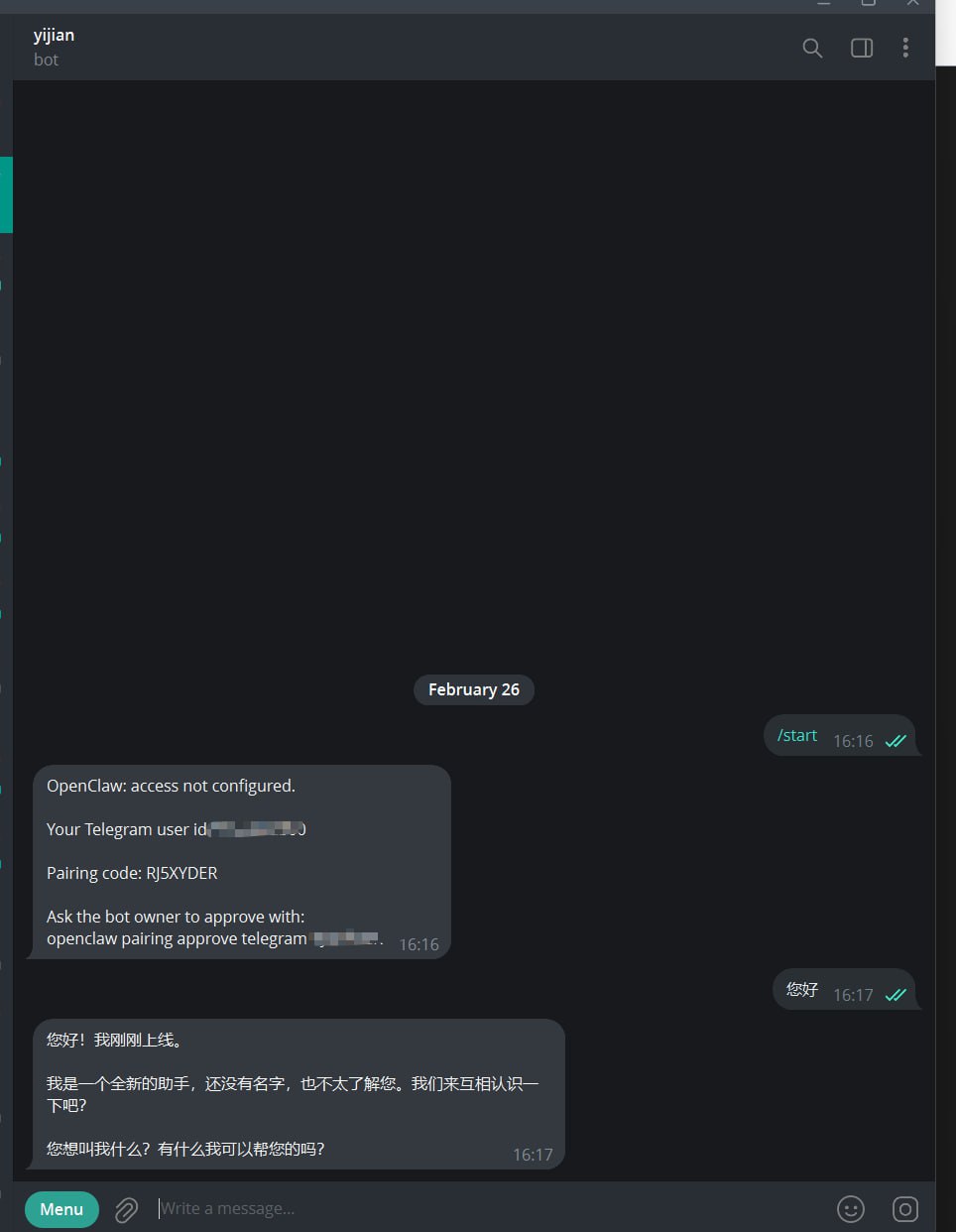 After deployment, send /start in Telegram to pair and start chatting with your AI assistant
Prerequisites
| Item | How to Get |
| Crazyrouter API Key | Register at crazyrouter.com |
| Telegram Bot Token (optional) | Create via @BotFather on Telegram |
Server requirements:
- Linux (Ubuntu/Debian/CentOS) or macOS
- 4GB+ RAM
- Internet access
One-Command Install
curl -fsSL https://raw.githubusercontent.com/xujfcn/crazyrouter-openclaw/main/install.sh | bash
Or download first:
wget https://raw.githubusercontent.com/xujfcn/crazyrouter-openclaw/main/install.sh
bash install.sh
Non-interactive mode:
CRAZYROUTER_API_KEY=sk-yourkey curl -fsSL https://raw.githubusercontent.com/xujfcn/crazyrouter-openclaw/main/install.sh | bash
Installation Process
The script runs 10 automated steps with progress bars and an ASCII art banner:
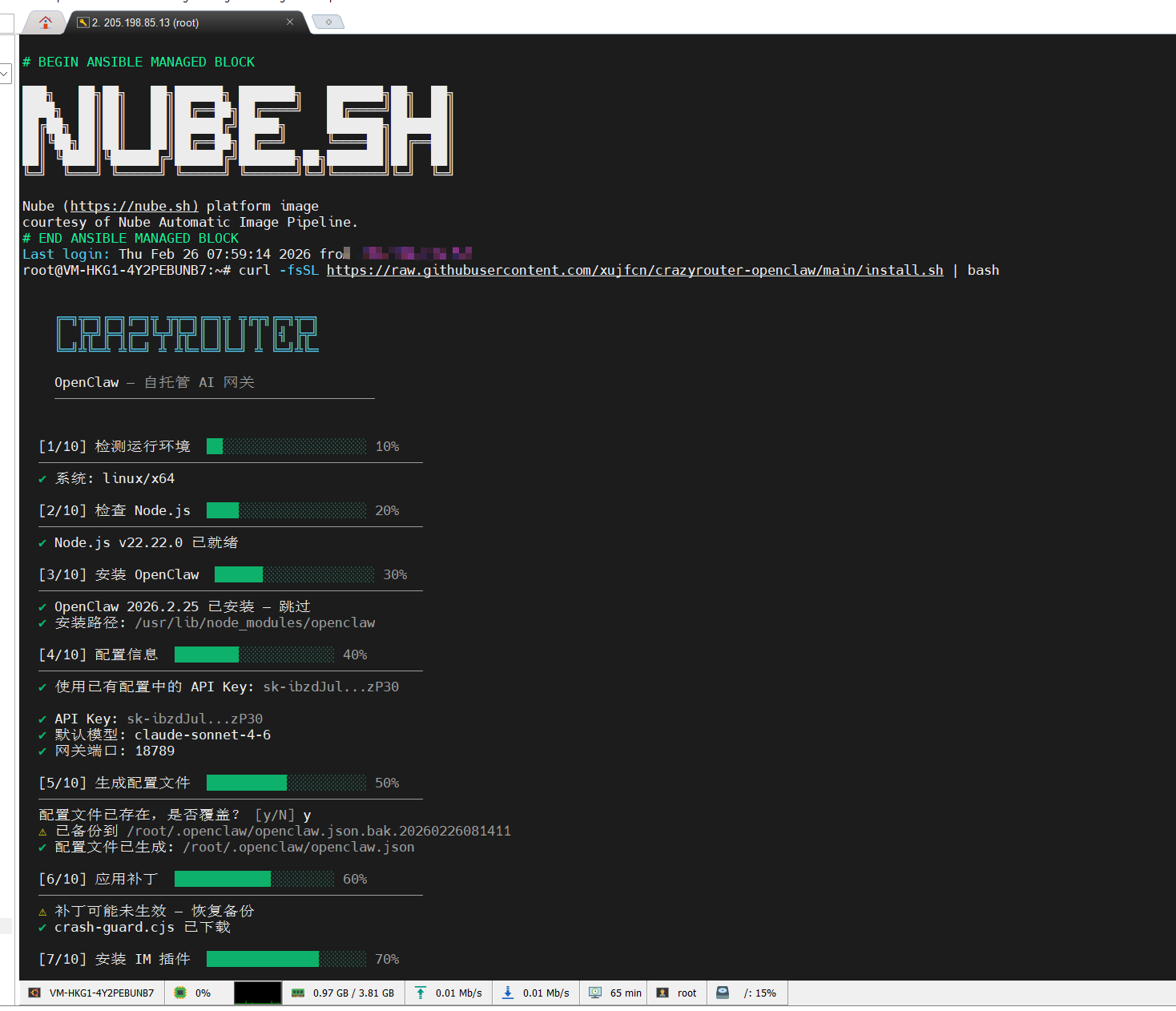 Steps 1-7: System detection, Node.js and OpenClaw installation, config generation, stability patch
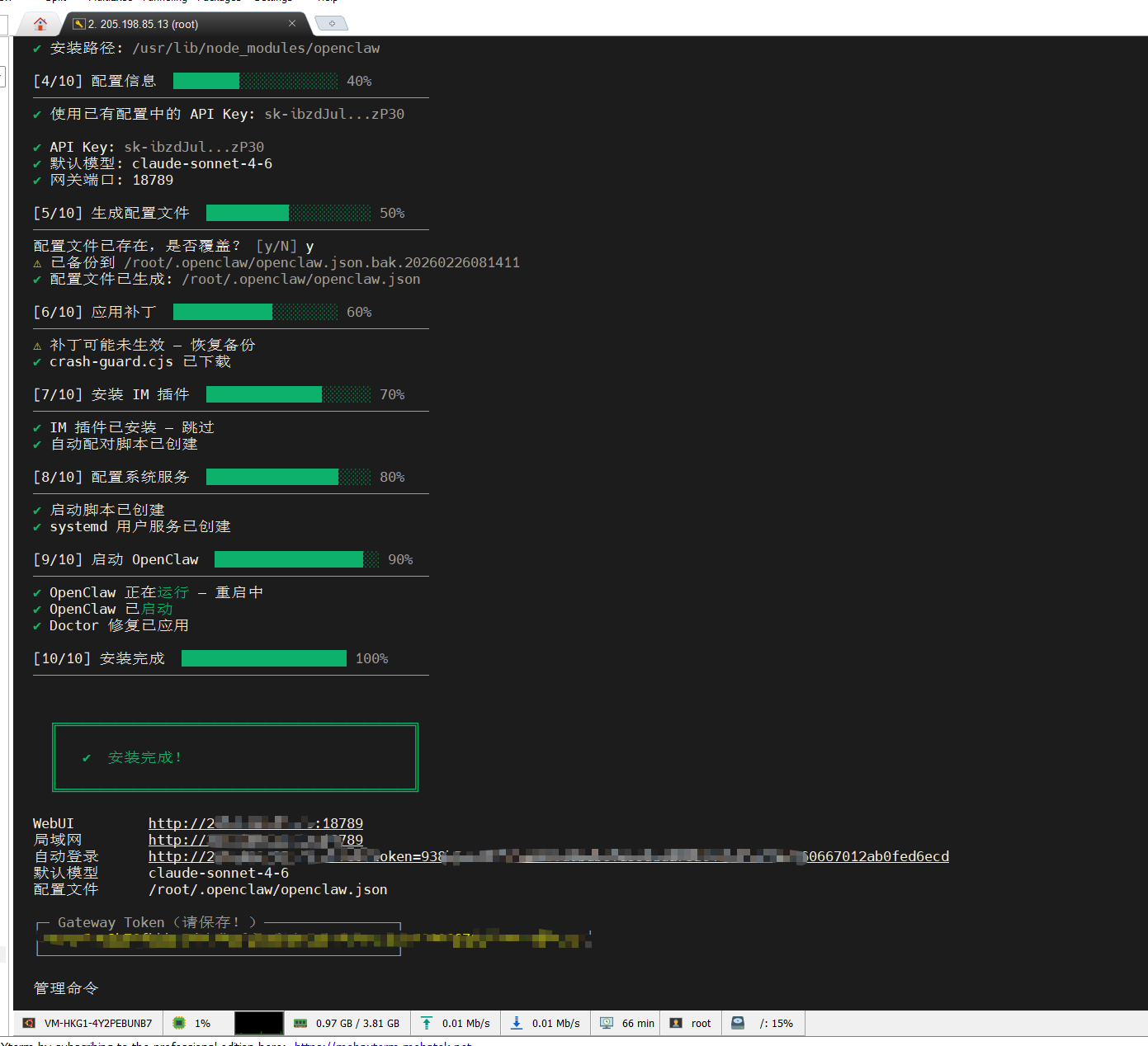 Steps 7-10: IM plugins, systemd service, gateway startup
After completion, the script displays:
- WebUI access URL
- Default model (claude-sonnet-4-6)
- Config file path
- Gateway Token (save this!)
- Management commands
Total time: ~2-5 minutes depending on network speed.
Pre-configured Models
| Vendor | Model | Strength |
| Anthropic | Claude Opus 4.6 | Best overall |
| Anthropic | Claude Sonnet 4.6 | Best value |
| OpenAI | GPT-5.2 | Latest flagship |
| OpenAI | GPT-5.3 Codex | Code specialist |
| Gemini 3.1 Pro | Long context | |
| Gemini 3 Flash | Ultra-fast | |
| DeepSeek | R1 | Strong reasoning |
| DeepSeek | V3.2 | Best for Chinese |
| Others | Kimi K2.5, GLM-5, Grok 4.1, MiniMax M2.1 | Various strengths |
All models through Crazyrouter — one API key for everything.
Connecting Telegram Bot
Step 1: Create a Bot
Search @BotFather on Telegram, send /newbot, follow the prompts:
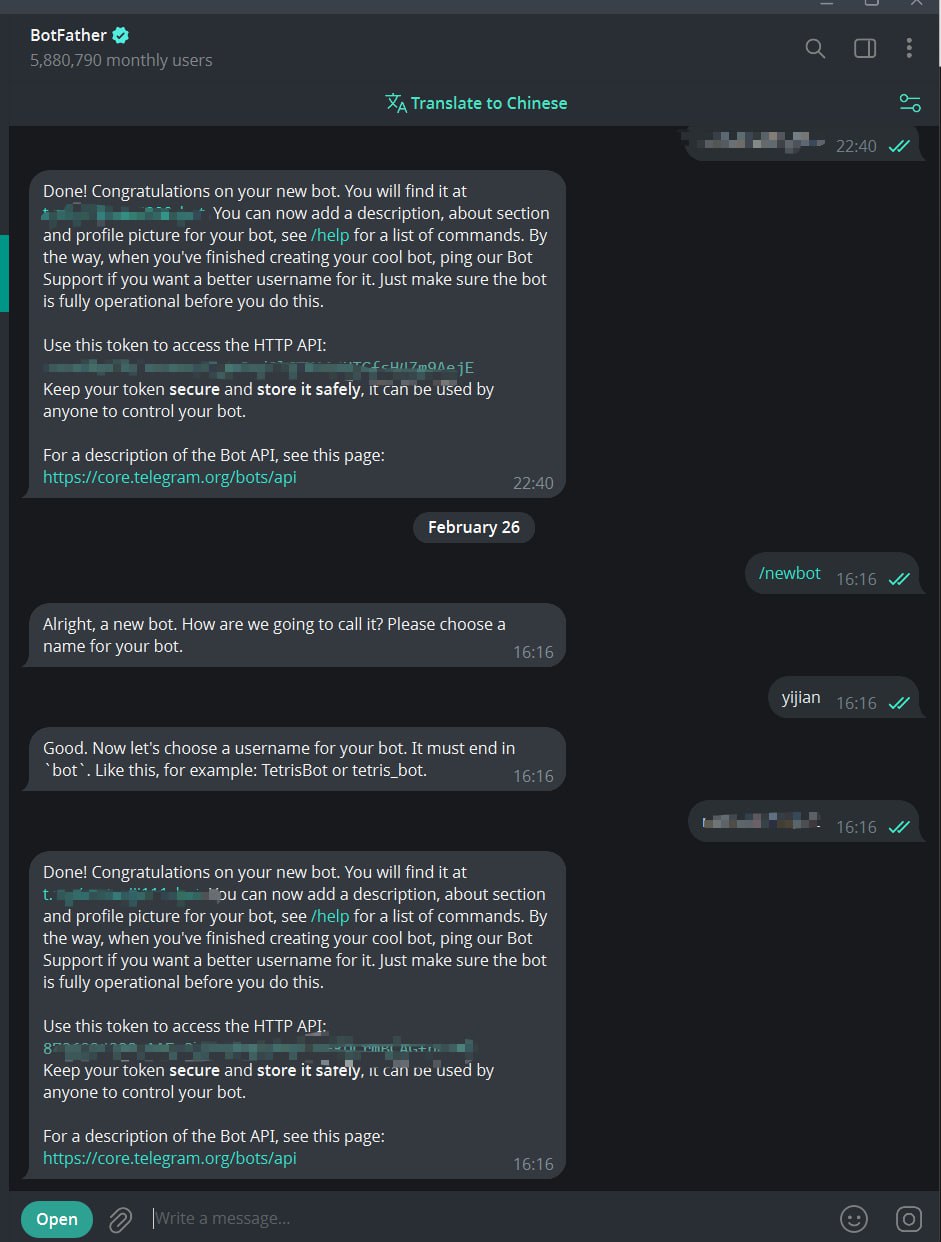 Create a Bot in BotFather and get your Token
Step 2: Paste Token and Pair
Paste the token into the install script. It automatically writes config, restarts the gateway, and guides you through pairing:
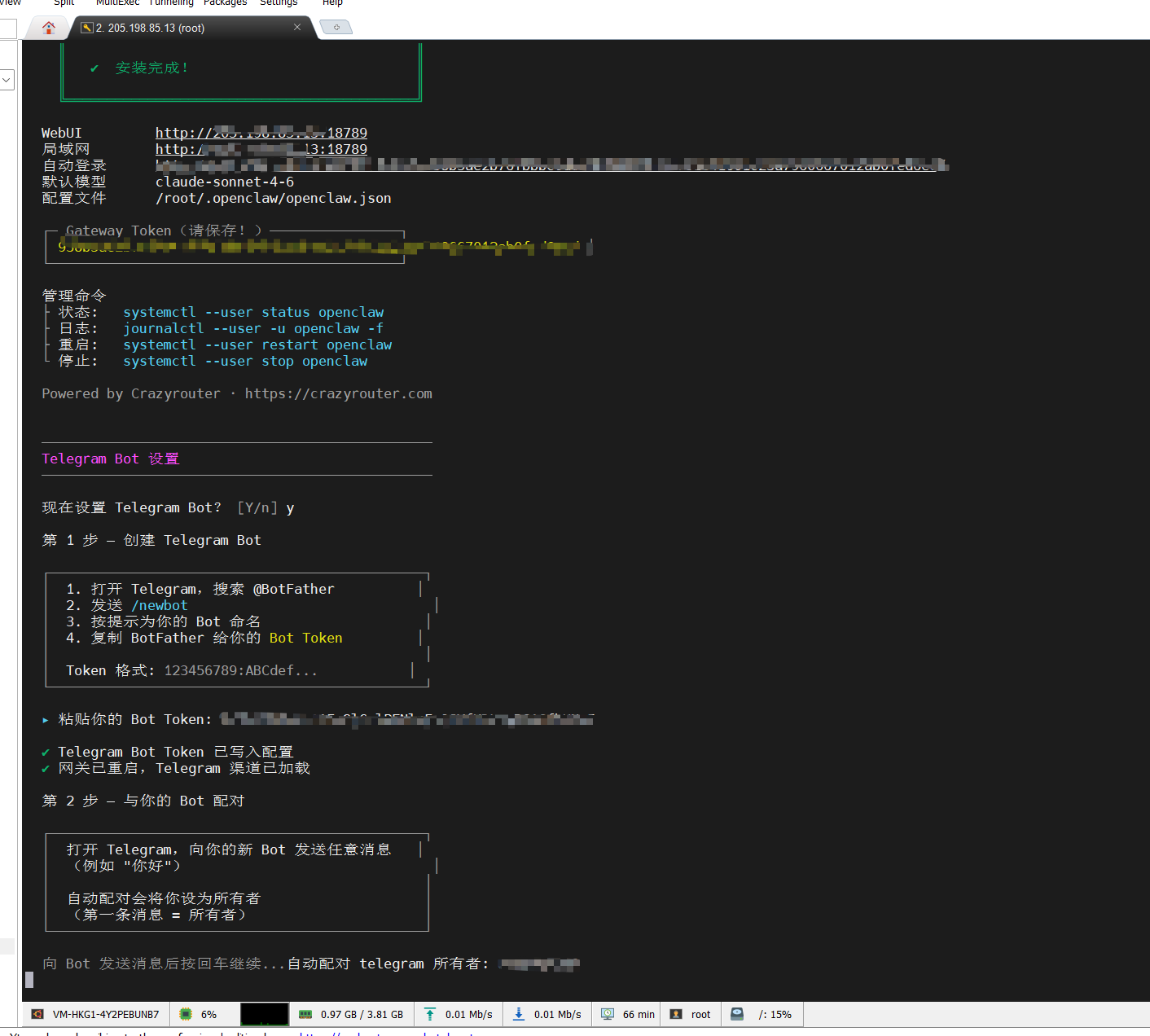 Interactive guide: paste Token, write config, restart, auto-pair
Step 3: Start Chatting
After pairing, just talk to your Bot on Telegram:
After /start pairing, the AI assistant greets you automatically
Supported IM Platforms
- Discord — Gaming community AI
- Slack — Team collaboration AI
- Feishu/Lark — Enterprise AI
- DingTalk — Office AI assistant
- WeCom — WeChat ecosystem AI
- QQ Bot — Social AI
Docker Deployment (Optional)
git clone https://github.com/xujfcn/crazyrouter-openclaw.git
cd crazyrouter-openclaw
docker build -t openclaw-bot .
docker run -d --name openclaw-bot -p 18789:18789 -v ~/.openclaw:/root/.openclaw openclaw-bot
Post-Install Management
# Linux (systemd)
systemctl --user status openclaw    # Status
journalctl --user -u openclaw -f   # Live logs
systemctl --user restart openclaw  # Restart
systemctl --user stop openclaw     # Stop
Stability
Built-in crash-guard.cjs handles Node.js 22 + undici 7.x TLS crashes:
- TLS Session protection against null pointer crashes
- Automatic suppression of transient undici errors
- Stale lock file cleanup
- Memory directory backup every 5 minutes
Your AI gateway runs 24/7 without manual intervention.
FAQ
Q: How is Crazyrouter different from OpenRouter? Lower prices, supports Chinese models (DeepSeek, Kimi, GLM), fully OpenAI-compatible API. No overseas credit card needed.
Q: Can it run on Raspberry Pi? Yes! The script supports arm64. Raspberry Pi 4/5 works perfectly.
Q: How much does it cost? Crazyrouter charges per token, cheaper than official APIs. See crazyrouter.com.
Summary
One command gives you:
- Private gateway for 300+ AI models
- Telegram AI assistant available 24/7
- Auto-start + crash recovery
- Unified API interface
curl -fsSL https://raw.githubusercontent.com/xujfcn/crazyrouter-openclaw/main/install.sh | bash
Try it — you'll have your own AI in 2 minutes.
Links:
